PMO Pilot

Paste the status notes. Present the plan.

PMO Pilot is a PowerPoint add-in that reads meeting notes, emails and spreadsheets and builds the timeline, the IPS board and the RACI chart for you — from native, editable shapes. When the dates move, it moves them and keeps your tweaks.

Works in PowerPoint for Windows, Mac and the web. Free plan, no card needed.

Priya ShahRe: Checkout 2.0 status

Quick recap from today's standup:

Discovery wrapped up Sep 18, thanks all. Maya's checkout redesign runs through Oct 30.

Raj says the Payments API needs until Nov 20 (was Nov 6), and Lee can't start the mobile build until the API lands, so that's Nov 23 to Jan 8.

Still aiming for beta on Dec 1 and GA on Jan 19. Can someone put this on a slide for Thursday's steering committee?

Checkout 2.0 launch plan Timeline from August to January. Payments API slipped two weeks and is on the critical path with the mobile app build and general availability on January 19. Checkout 2.0 — launch plan Steering committee, Oct 1 SepOctNovDecJan ’27 Today Discovery · Priya Checkout redesign · Maya Payments API · Raj · +14 d Mobile app build · Lee Beta · Dec 1 GA · Jan 19 Critical path: Payments API → Mobile app build → GA (Jan 19, 11 days of float left)
Illustration. PMO Pilot shows every date it read from your notes for review before anything is added to the slide.

The slide takes longer than the meeting.

Program managers lose the evening before every steering committee to the same five chores. PMO Pilot does each one for you.

Retyping dates out of emails and meeting notes
Reads tasks, dates, owners, status and dependencies from plain text, a transcript or a spreadsheet. No column mapping.
Nudging labels that pile on top of each other
A layout engine places every label where it fits, stacks rows only when it has to, and keeps text off the bars.
Rebuilding the slide when a date slips
Change a date in the pane, paste a new CSV or just type “push phase 2 out 3 weeks”. Bars move; the labels you dragged and the colors you changed stay put.
Recoloring everything to match the corporate template
Picks up your deck’s theme fonts and colors, or pulls a palette from your company website.
Squeezing a 40-row plan onto one slide
Split it by workstream or into pages. Every slide keeps the same timescale, so they line up when you flip through them.
Drawing the IPS board and RACI chart by hand
32 program diagrams that do the arithmetic: workstream totals, critical path, weighted scores, risk ratings.

From inbox to slide in four steps

Checkout-2.0-SteerCo.pptx
PMO Pilot task pane with a pasted status email and a Generate timeline button

Paste whatever you have. PMO Pilot sends text to its AI only when you press Generate; recognizable spreadsheets are read on your computer and never leave it.

Built for the review, not the demo

Labels that never collide

Most timeline tools leave you dragging text boxes apart at midnight. PMO Pilot measures every label before it draws, puts it where it fits, and only adds a row when there is no room. Swimlanes by owner or workstream, dependencies and a Today line come standard on the free plan.

  • Swimlanes by owner, workstream or phase
  • Fiscal years, quarters, weeks or months
  • Percent complete and owner on every bar
Timeline with swimlanes by owner: Priya, Maya, Raj, Lee, Ana and Sam

Your edits survive the update

Move a label, recolor a bar, stretch a task by hand — then pull in next month’s dates. Smart-Lock remembers what you changed on the slide and keeps it. Update from a new Excel or CSV export, or just describe the change in plain English.

  • “Push phase 2 out 3 weeks and flag it red”
  • Save a baseline and show plan vs actual
  • Undo any AI change in one click
Scenario controls: delayed launch scenario with plan shown as ghost bars Delayed-launch scenario with plan bars ghosted beneath the new dates

The critical path, on the slide

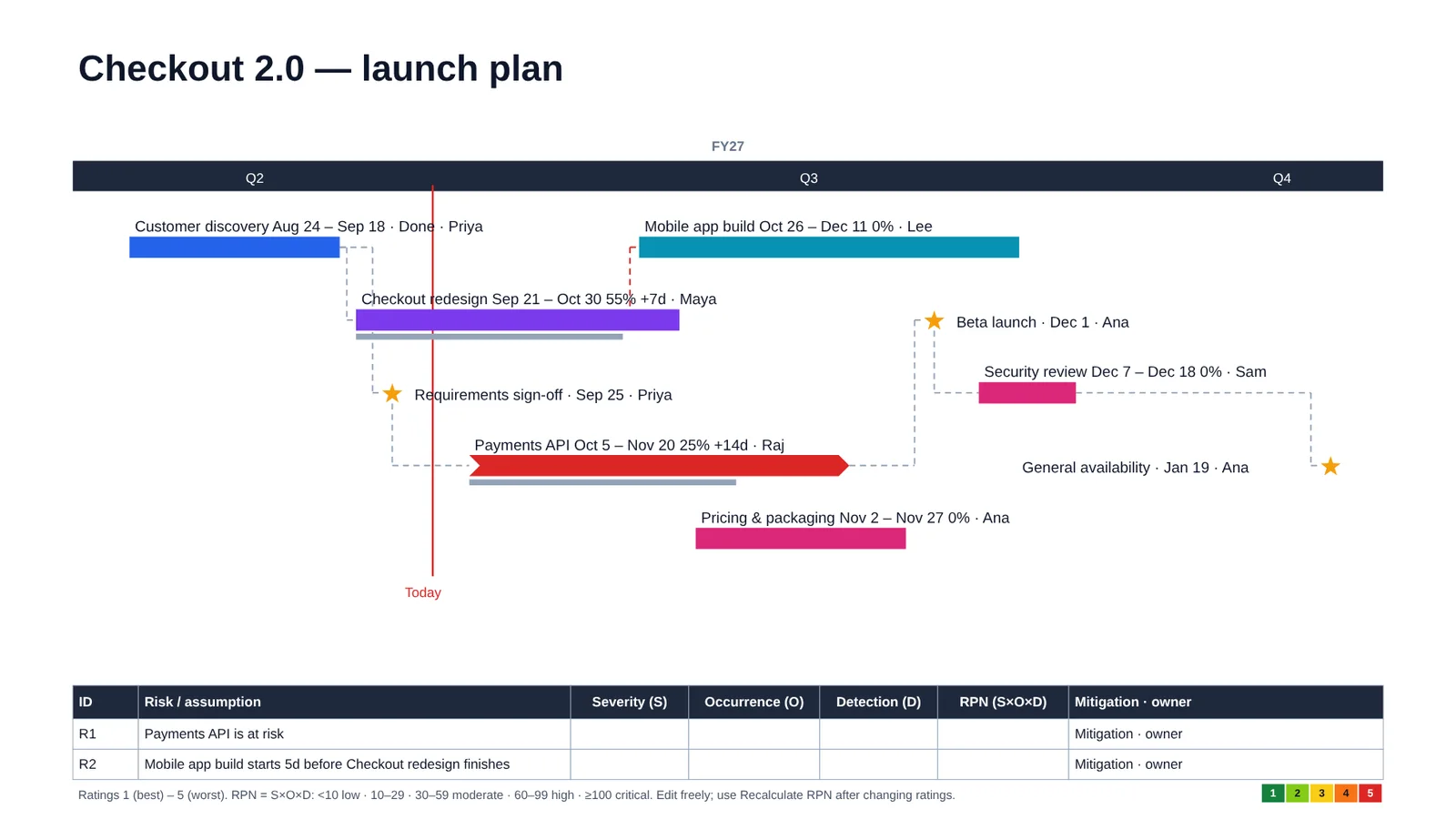
Turn on “Highlight critical path” and PMO Pilot follows the dependencies back from the finish date, outlines the driving chain in red and names it in a footnote. Slip anything on that chain and the end date moves; everything else has float.

  • Works on any plan with predecessors, from a spreadsheet or from notes
  • Late dependencies are flagged even when the path is off
  • Ask for it in plain English: “show the critical path”
Timeline with the critical path outlined in red: Customer discovery, Requirements sign-off, Payments API, Beta launch, Security review, General availability

Looks that belong in your deck

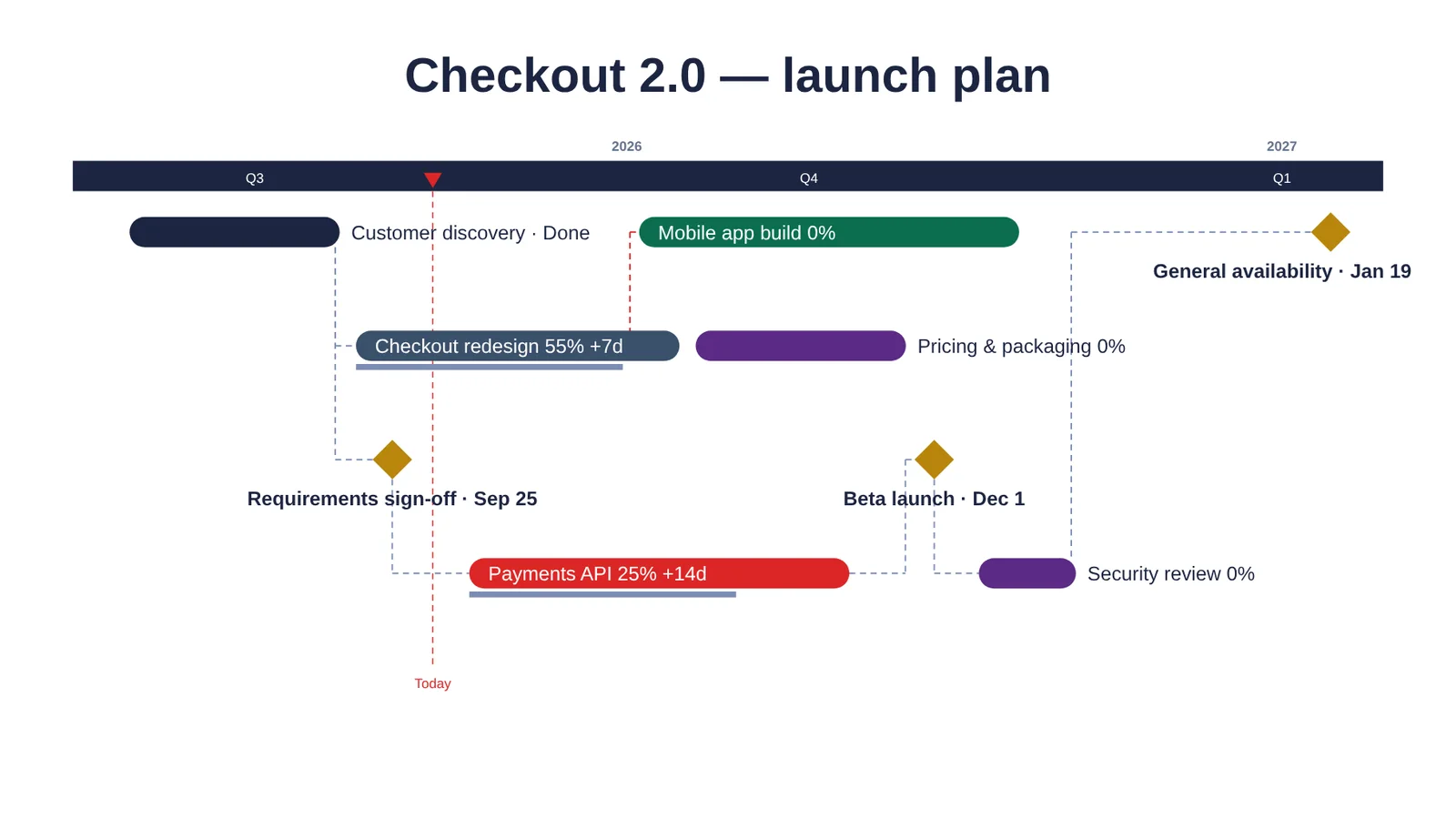
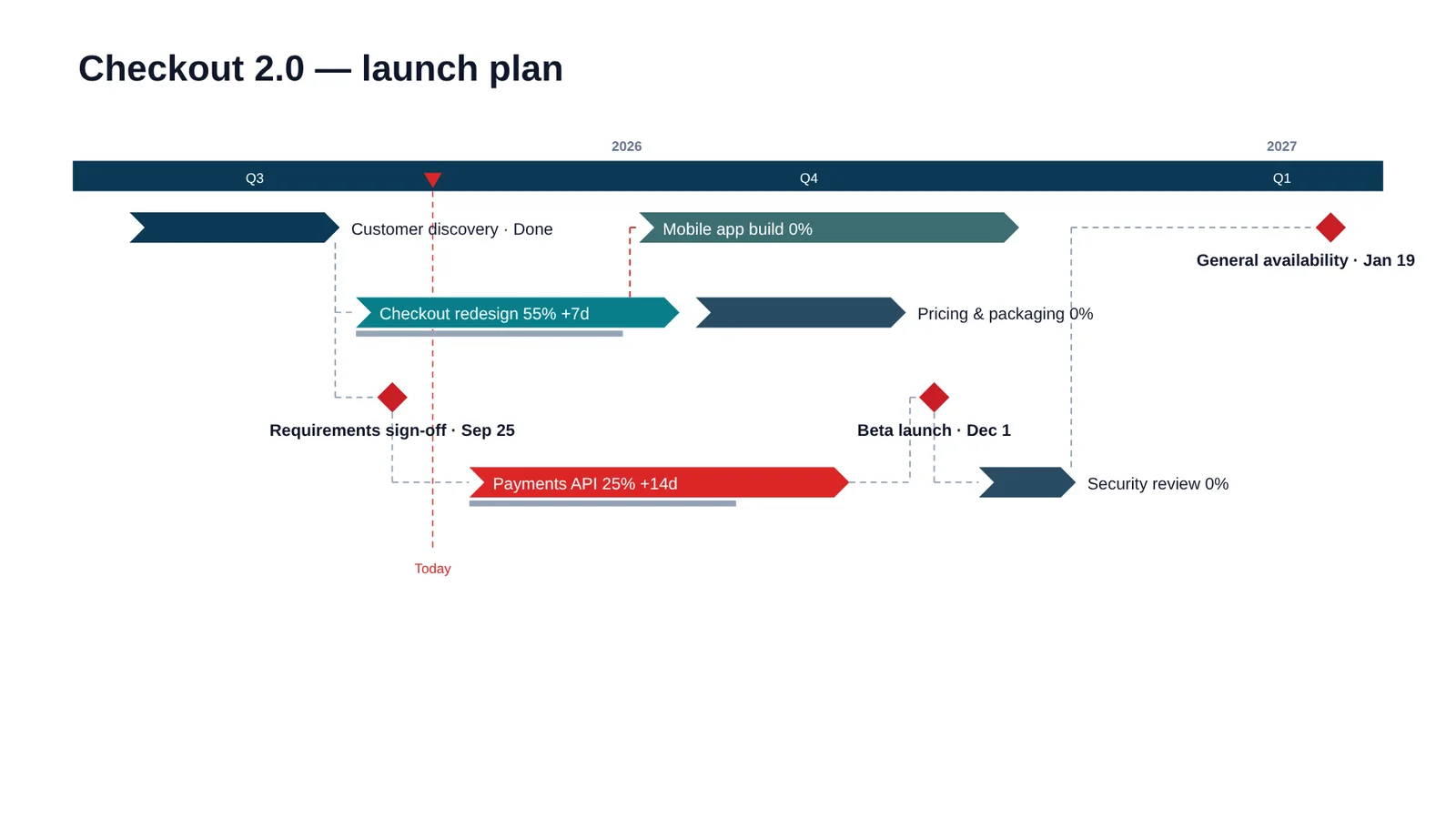
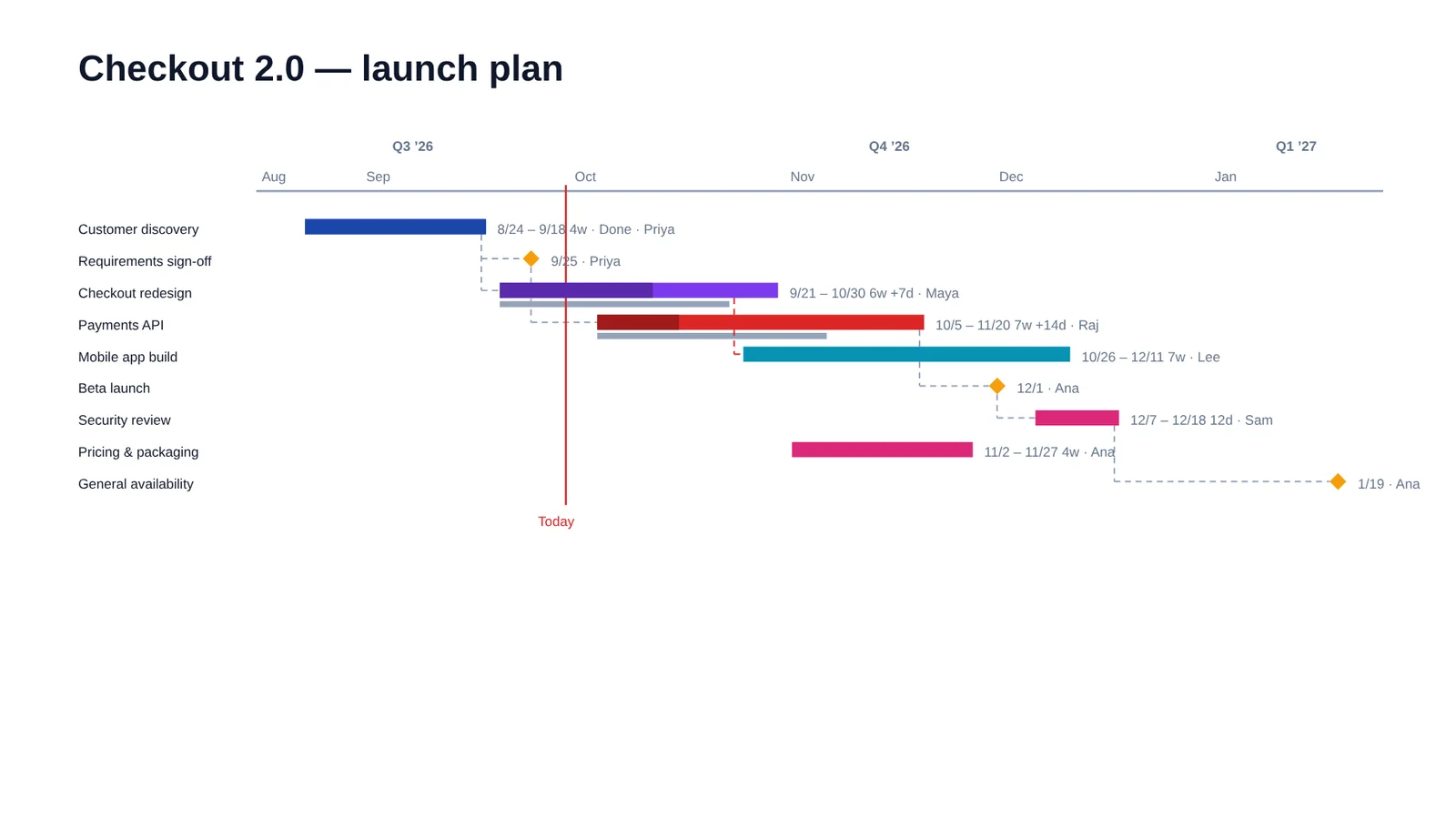
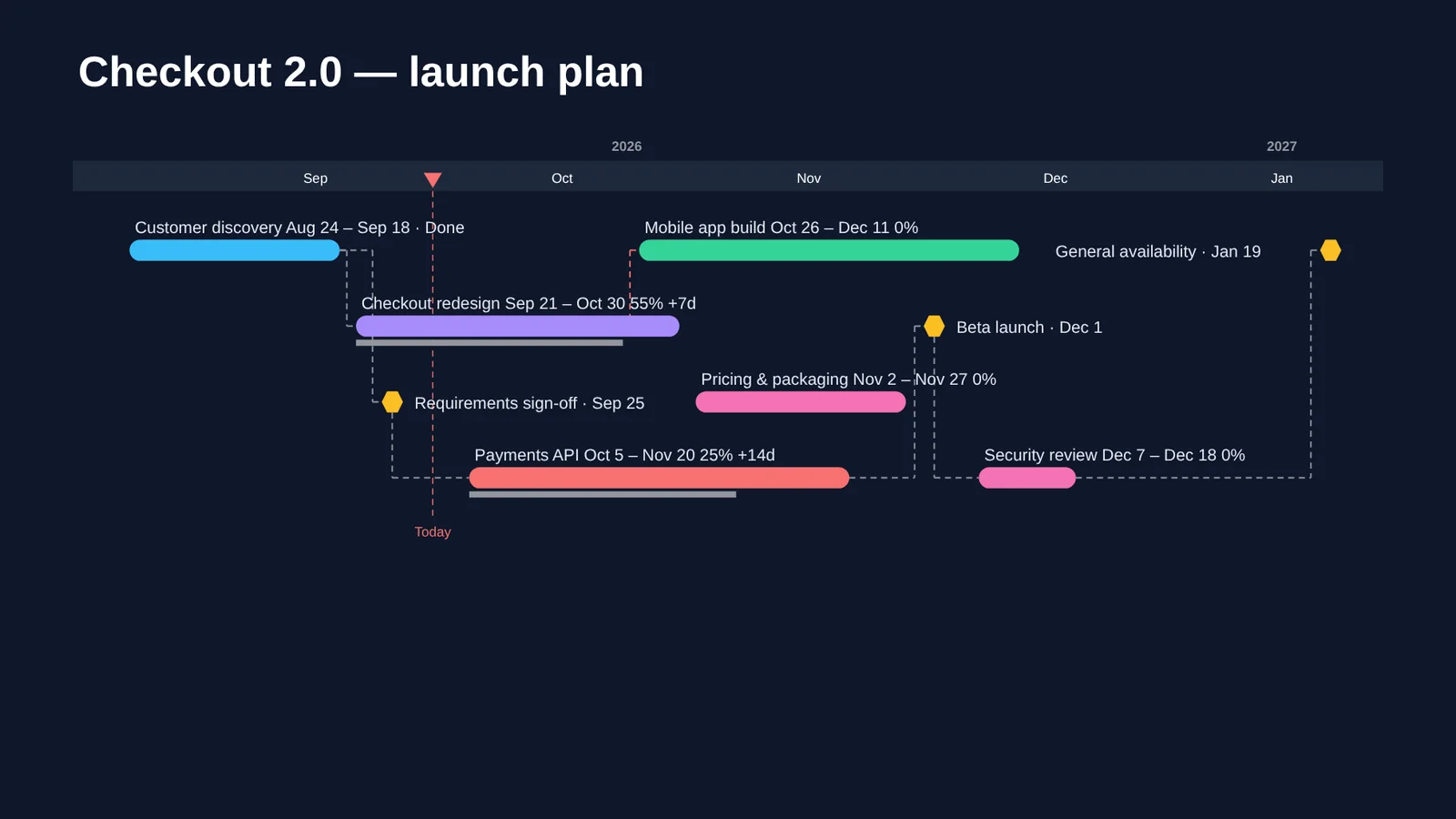
39 timeline looks, from a board one-pager to a detailed Gantt, medtech phase gates and a dark keynote style. One click applies your deck’s own fonts and colors so the slide doesn’t look pasted in.

  • Board one-pager look
    Board one-pager
  • Design Controls (Phase Gates) look
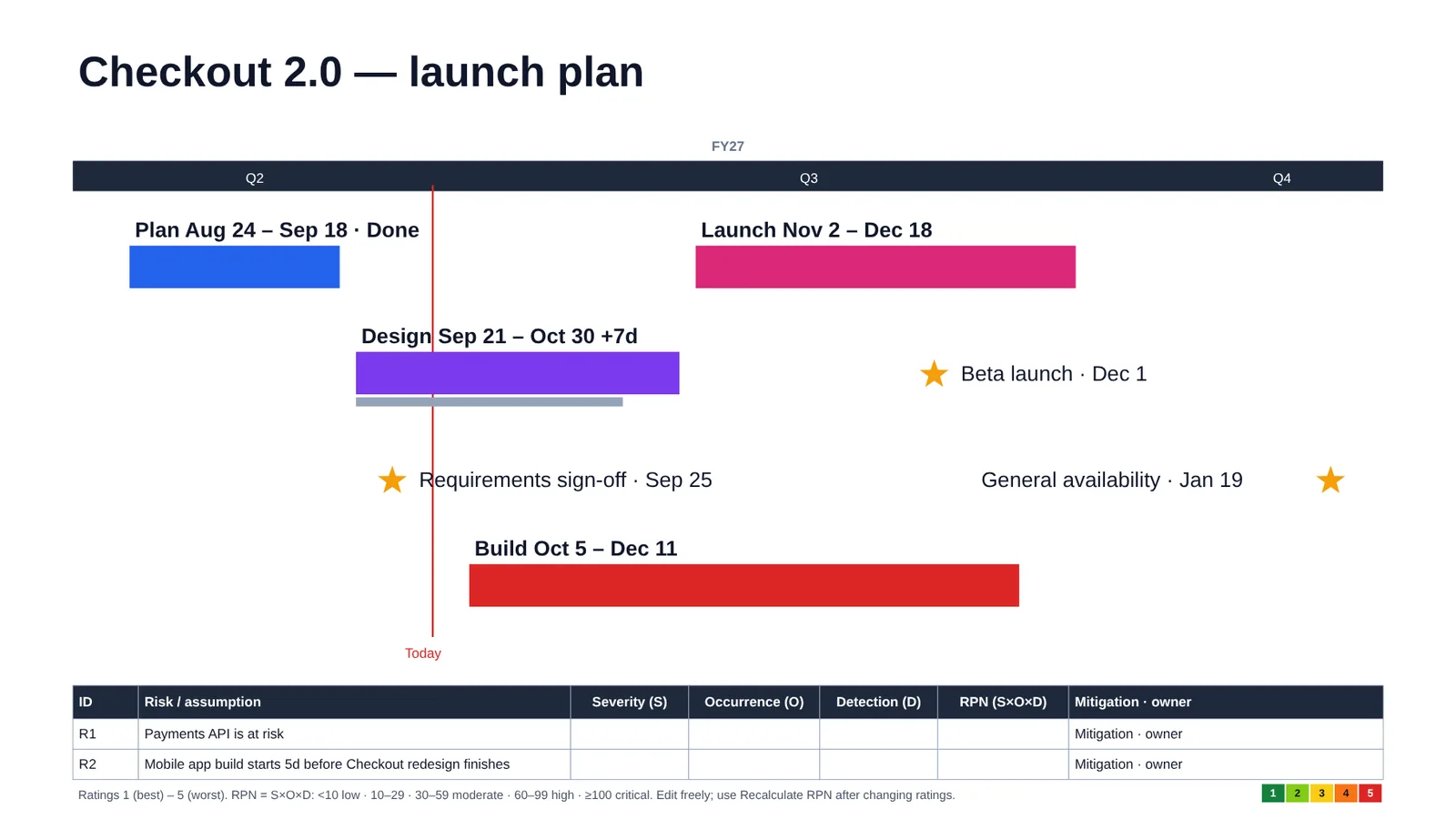
    Design controls phase gates
  • Detailed Gantt look
    Detailed Gantt
  • Dark Midnight look
    Midnight

The whole monthly review, not only the timeline

PMO Pilot builds the slides that travel with the timeline, from the same data, so they never disagree with each other.

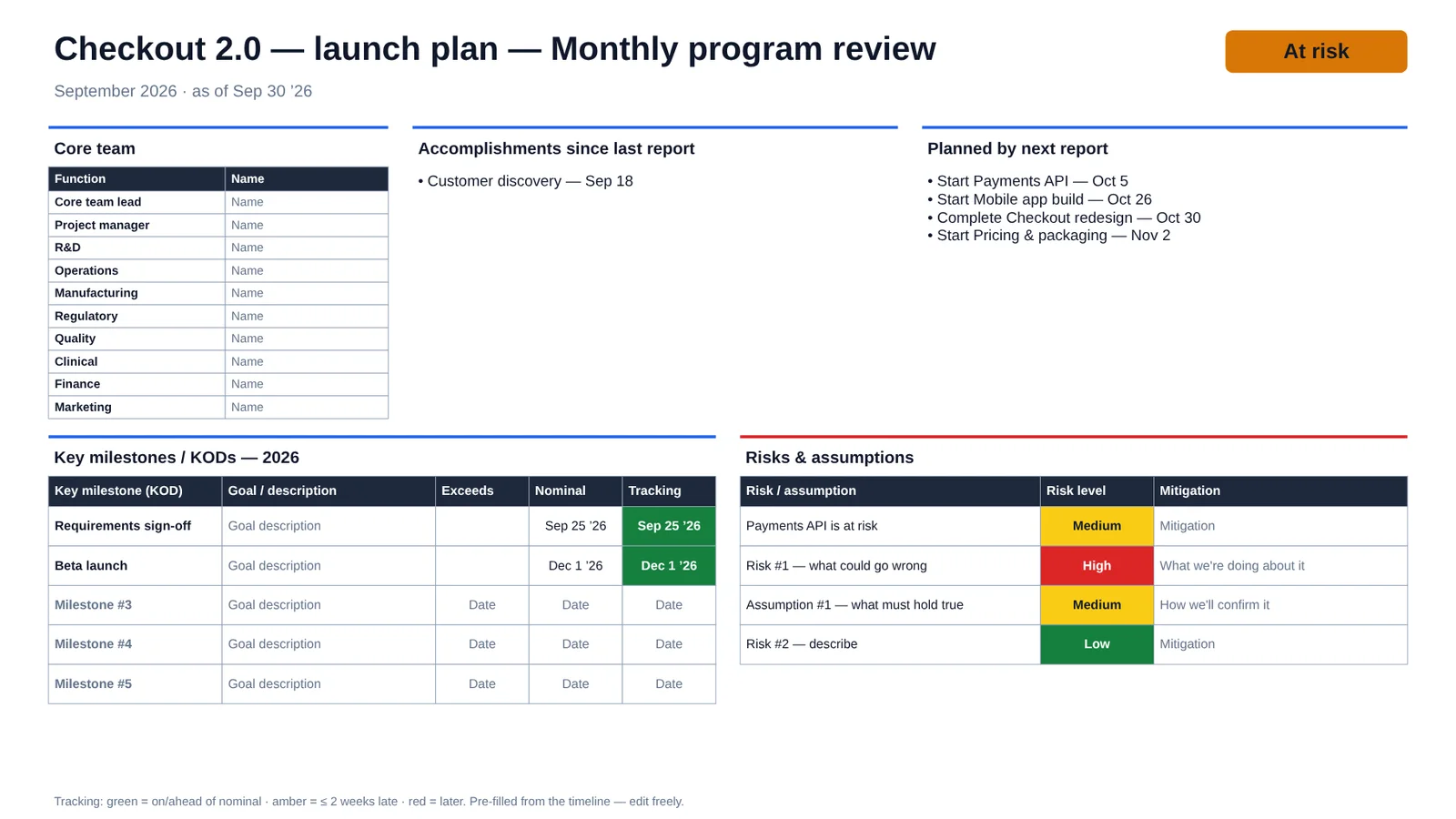
Monthly program review slide: core team, accomplishments, plans, milestones and risks

Core team, accomplishments, next steps, KPIs against plan and top risks, with the RAG status set from the schedule.

32 program diagrams that do the arithmetic

The diagrams PMOs actually draw, built as native shapes and tables. Edit a number on the slide, press Recalculate, and totals, scores and the critical path update without moving anything you arranged.

IPS board: goal, inputs by function, workstreams of task cards with owners and durations, totals per workstream in weeks, and the critical path outlined in red

The IPS board, done properly

An Intensive Planning Session board with the goal across the top, inputs and outputs by function, and task cards for each workstream.

  • Every card shows its owner, duration and a short description
  • Each workstream shows its total in weeks
  • The critical path is computed and outlined in red
  • Change a duration on the slide and the path moves with it
  • Or paste the workshop notes and let AI fill the board

It’s PowerPoint all the way down

Native shapes, not a picture

Every bar, card and table is an ordinary PowerPoint shape. Colleagues without PMO Pilot can open, edit and present the deck.

Windows, Mac and the web

Built on Microsoft’s modern Office add-in platform, so it works the same in PowerPoint for Windows, Mac and the browser. Nothing to install on your machine.

Your plan lives in your file

Timeline data is stored inside the presentation, not on our servers. Text sent for AI parsing is used for your request and not kept, and never used to train models.

Pricing

Swimlanes, dependencies, spreadsheet import and Smart-Lock are free. Pay for AI at volume, the full library and the program layer.

Free

$0

For a timeline a month and the occasional diagram.

  • Unlimited timelines from Excel or CSV
  • 3 AI timelines and 10 AI edits a month
  • Swimlanes, dependencies, Today line
  • Smart-Lock keeps your manual tweaks
  • 15 timeline looks, 12 program diagrams
Get early access

Pro

$99 per year, about $8.25 a month

For PMs who present every month.

  • 100 AI timelines and 300 AI edits a month
  • All 39 looks and 32 program diagrams
  • Scenarios and plan vs actual
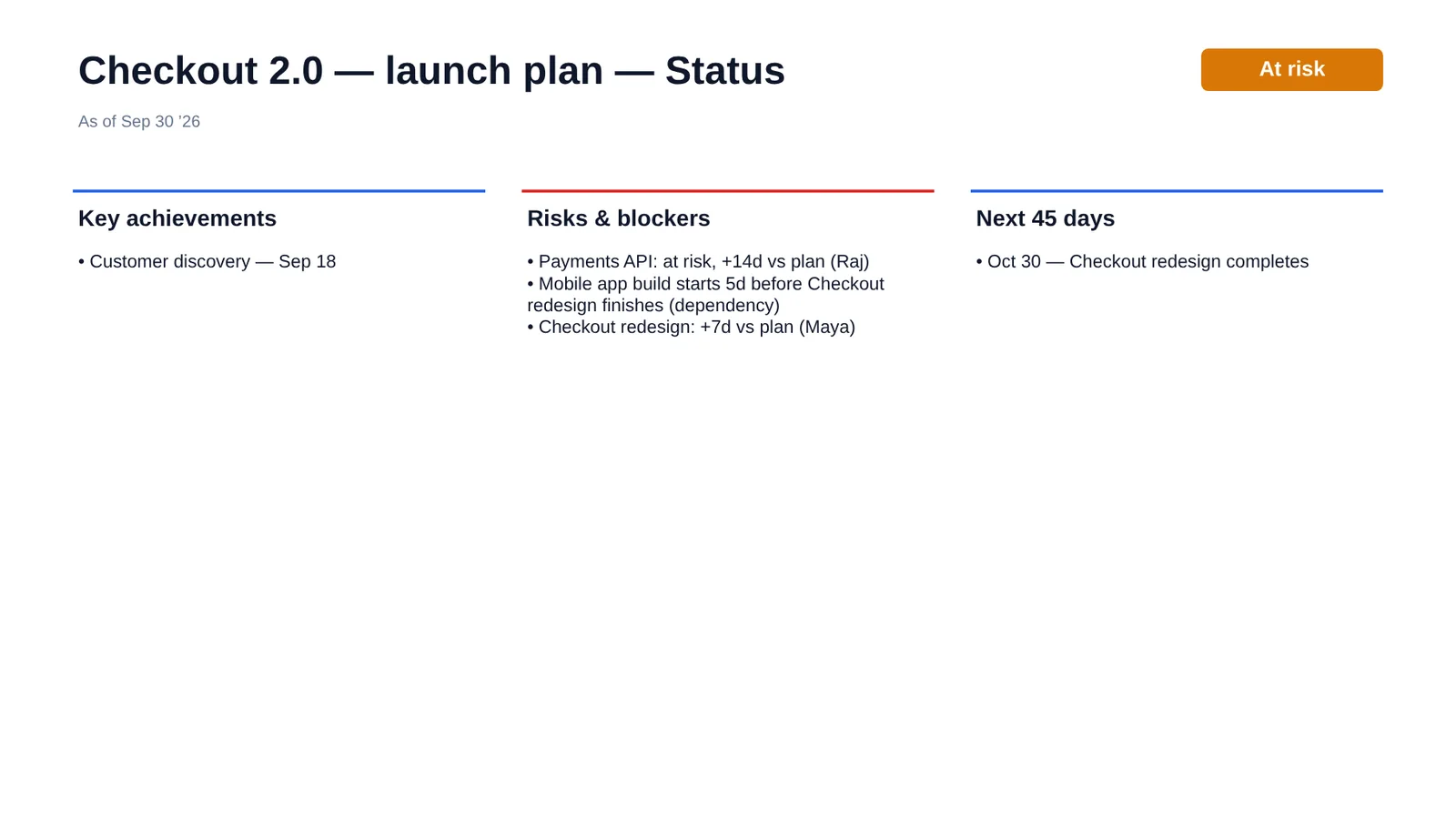
  • Monthly review, status and exec summary slides
  • FMEA and risk tables, update from Excel
  • Brand colors from your website

Need it for one big deck? A 7-day Pro pass is $9, no subscription.

Start the 14-day trial

Team

$15 per user a month, billed yearly, 3 seats minimum

For a PMO that wants every deck to match.

  • Everything in Pro
  • Shared brand kits and template library
  • Higher AI limits
  • Live Excel, Jira and Notion sync (on the roadmap)
Talk to us
  • Switching from another timeline add-in? Your first year of Pro annual is $49 with code SWITCH50.
  • Students, teachers and non-profits get 50% off.
  • 30-day money-back guarantee on annual and lifetime plans.

Prices in US dollars. Launch pricing; taxes may apply.

Questions

Which versions of PowerPoint does it work with?

PowerPoint for Microsoft 365 on Windows and Mac, and PowerPoint for the web. On older builds a few things are drawn more simply, for example tables as individual cells, and the add-in tells you when that happens.

Can people without PMO Pilot edit the slides?

Yes. Everything is made of ordinary PowerPoint shapes and tables. Anyone can open, edit and present the deck. PMO Pilot is only needed to regenerate or recalculate.

What happens to the notes I paste?

If the text is a table PMO Pilot can read, it is processed on your computer and never sent anywhere. Otherwise it goes to our service and our AI provider to extract dates and tasks, and is discarded after your request. We don’t sell your data or use it to train AI. See the privacy policy.

What if the AI reads a date wrong?

Every inferred date is listed on a review screen before anything is added, with ambiguous formats flagged. Nothing reaches your slide until you press Insert, and any AI change can be undone.

Can I bring in a plan from Excel, Smartsheet or MS Project?

Yes. Export to Excel or CSV and paste or upload it. PMO Pilot recognizes the column names those tools use — MS Project (Task Name, Start, Finish, Predecessors, Resource Names), Jira (Summary, Assignee, Parent summary, Due date), Smartsheet and Asana — without any mapping. And it works the other way too: Download CSV in the Edit tab gives you the plan back in a file Excel or MS Project can open.

Can I get my data back out?

Always. The plan is stored in your PowerPoint file, and Download CSV (Edit tab, free plan included) writes it to a spreadsheet with tasks, dates, owners, status, baselines and dependencies. Nothing is locked in.

Do I need an account?

Spreadsheet import, layout and styling work without one. AI features and paid plans need a free PMO Pilot account.

Is PMO Pilot made by Microsoft?

No. PMO Pilot is an independent product and is not affiliated with or endorsed by Microsoft.

Your next steering committee is already on the calendar.

PMO Pilot is heading to Microsoft AppSource. Join the early access list and we’ll send you the install link and a founding-member price.

Request early access